 blog
blog
Best Apps for Tracking Shiny Pokémon in 2026
Table of Contents
- What Makes a Good Shiny Pokémon Tracker App
- Shiny Pokémon Tracker App Features That Matter
- Using a Shiny Hunt Counter App for Accurate Tracking
- Building Your Pokémon Shiny Checklist
- Track Shiny Pokémon Across Games Effectively
- Why Dedicated Shiny Trackers Beat Spreadsheets
- Choosing the Right Tool for Your Hunting Style
- Frequently Asked Questions
Last Updated: October 16, 2026
What Makes a Good Shiny Pokémon Tracker App
A good shiny pokemon tracker helps you count encounters, monitor odds, and organize your collection across multiple games without losing data or getting confused. The best apps balance simplicity with power.
What separates a useful tracker from a frustrating one? Speed and clarity. You need to log an encounter in seconds, not minutes. The app should show your progress at a glance.
Most trackers fail because they force you into their workflow instead of adapting to yours. A good shiny Pokémon tracker respects how you hunt.
The tracker should also survive beyond this year. If a new Pokémon game launches next month, you shouldn't have to switch apps or wait months for an update.
Shiny Pokémon Tracker App Features That Matter
Encounter counting and hunt progress
The core job of any shiny hunt counter app is simple: count your encounters and show progress toward the shiny odds. But the implementation varies wildly.
Some apps require manual entry for every encounter. You tap a button after each catch. This takes discipline but gives you precise data. Other apps integrate with your game to count automatically.
The best trackers let you choose. Manual counting for players who like control. Automatic counting for those who want speed.
Your hunt progress should be visible instantly. A progress bar showing how many encounters until the shiny odds spike is essential. Some trackers show estimated time to shiny based on your encounter rate.
Game compatibility and multiple save files
Not every app supports every Pokémon game. Some only track Pokémon Scarlet and Violet. Others cover older generations but miss the newest releases.
You also need to track multiple save files separately. A main playthrough, a Nuzlocke run, and a replay of an older game should never blur together. Each save needs its own hunt history and collection data.
The best shiny Pokémon tracker apps let you create separate profiles for each save file. Switch between them instantly. See which game you've made the most progress on.
Check compatibility before committing. If your favorite game isn't supported, the app won't help. And if a new game launches next year, you need confidence the app will adapt quickly.
Privacy and data ownership
Your collection data is valuable to you. If the app shuts down or stops getting updates, you could lose years of hunt records.
The best trackers let you export your data. A CSV file, a JSON backup, or a simple download option ensures you own your information. Some apps store everything locally on your device.
Ask yourself: if this app disappeared tomorrow, could I recover my data? If the answer is no, that's a red flag.
Also consider account requirements. Do you need to create a login and share personal information? Or can you use the app without an account? Some players prefer privacy. Others don't mind an account if it means syncing across devices.
Using a Shiny Hunt Counter App for Accurate Tracking
Manual vs automatic encounter counting
Manual counting gives you precision. You control every number. Some hunters use a physical clicker to count encounters, then log the total into their app.
Automatic counting is faster. Some apps integrate with your game to detect encounters. You don't have to do anything. But automatic counters only work if the app supports your specific game version.
Most serious hunters use a hybrid approach. They count manually during the hunt, then bulk-import the total into the app at the end of the session. This balances speed and accuracy.
The key is consistency. Pick one method and stick with it. Switching between manual and automatic mid-hunt creates gaps in your data.
Monitoring shiny odds and probability
Shiny odds vary by game and hunting method. Some methods give you a 1 in 512 chance. Others push it to 1 in 100 or better.
The app should display how many encounters until the odds change. In some games, shiny odds improve after a certain number of encounters. Seeing that threshold helps you plan.
Some trackers estimate your time to shiny based on your encounter rate. If you average 60 encounters per hour, the app calculates roughly how long until you hit the odds.
But remember: odds are probability, not guarantees. You could hit a shiny in 10 encounters or hunt for 2,000. The app shows the math, not the future.
Building Your Pokémon Shiny Checklist
Recording species, forms, and alternate variants
Every shiny hunt targets a specific Pokémon. Your tracker needs to record which species you're hunting and which form or variant you want.
Some Pokémon have multiple forms. Alcremie has dozens of forms, each with different colors and patterns. A good tracker lets you specify the exact form you're after.
Alternate variants matter too. In Pokémon Legends: Arceus, Alpha Pokémon are larger and stronger. Some hunters specifically hunt Alphas. Your tracker should let you mark whether you're hunting a regular shiny, a shiny Alpha, or something else.
The best shiny Pokémon checklist apps let you customize what you track. Not everyone cares about forms. Some hunters only want the species. Others need every detail recorded.
Adding notes and hunt details
Notes turn your tracker into a journal. You can record where you hunted, what method you used, what time of day, or anything else that matters to you.
Some hunters note their encounter rate. "Got 300 encounters in 4 hours today, averaging 75 per hour." This helps you plan future hunts. Other hunters note the conditions.
A good tracker lets you add notes to each hunt session. You should be able to tag hunts by location, method, or game.
This is where a shiny Pokémon tracker beats a spreadsheet. You can search, filter, and analyze your hunt history. A spreadsheet is just rows of numbers.
Track Shiny Pokémon Across Games Effectively
Managing multiple game versions and save files
You probably play more than one Pokémon game. Your tracker needs to keep them organized.
Create a separate profile for each game. Pokémon Scarlet is one profile. Pokémon Legends: Arceus is another. Your completed save file from five years ago is a third. Each profile tracks its own hunts, collection, and progress independently.
Switch between profiles instantly. See your total shinies across all games, or focus on one game at a time. The app should show you which games are closest to 100% completion.
Some trackers let you set goals per game. "I want 50 shinies in Scarlet and 100 in Violet." The app tracks progress toward each goal separately. This is especially useful for completionists.
Consolidating collection data from past and current titles
You've probably hunted in older games. Pokémon Sword, Shield, Brilliant Diamond, Legends: Arceus. Your tracker should let you log those old hunts too.
The best apps let you import past data. Type in your old hunt records, and the app consolidates everything. You see your total shiny count across every game you've ever played.
Some trackers let you estimate if you don't have exact numbers. "I hunted in Diamond for about 2 months and got maybe 15 shinies." The app logs the estimate.
This is where a dedicated shiny pokemon tracker shines. A spreadsheet can't consolidate data across games easily. A tracker designed for this purpose handles it in seconds.
Why Dedicated Shiny Trackers Beat Spreadsheets
You could use Excel to track your shinies. Many hunters do. But a dedicated app does things a spreadsheet can't.
A spreadsheet is static. You enter data and it sits there. An app is dynamic.
Spreadsheets are also fragile. One accidental deletion and you lose data. An app stores backups automatically. If your device crashes, your data survives.
A spreadsheet doesn't adapt to new games. When a new Pokémon title launches, you manually add columns or create a new sheet. A good tracker adds new games instantly.
Most importantly, spreadsheets are boring to use. Logging data feels like work. A well-designed app makes tracking feel natural.
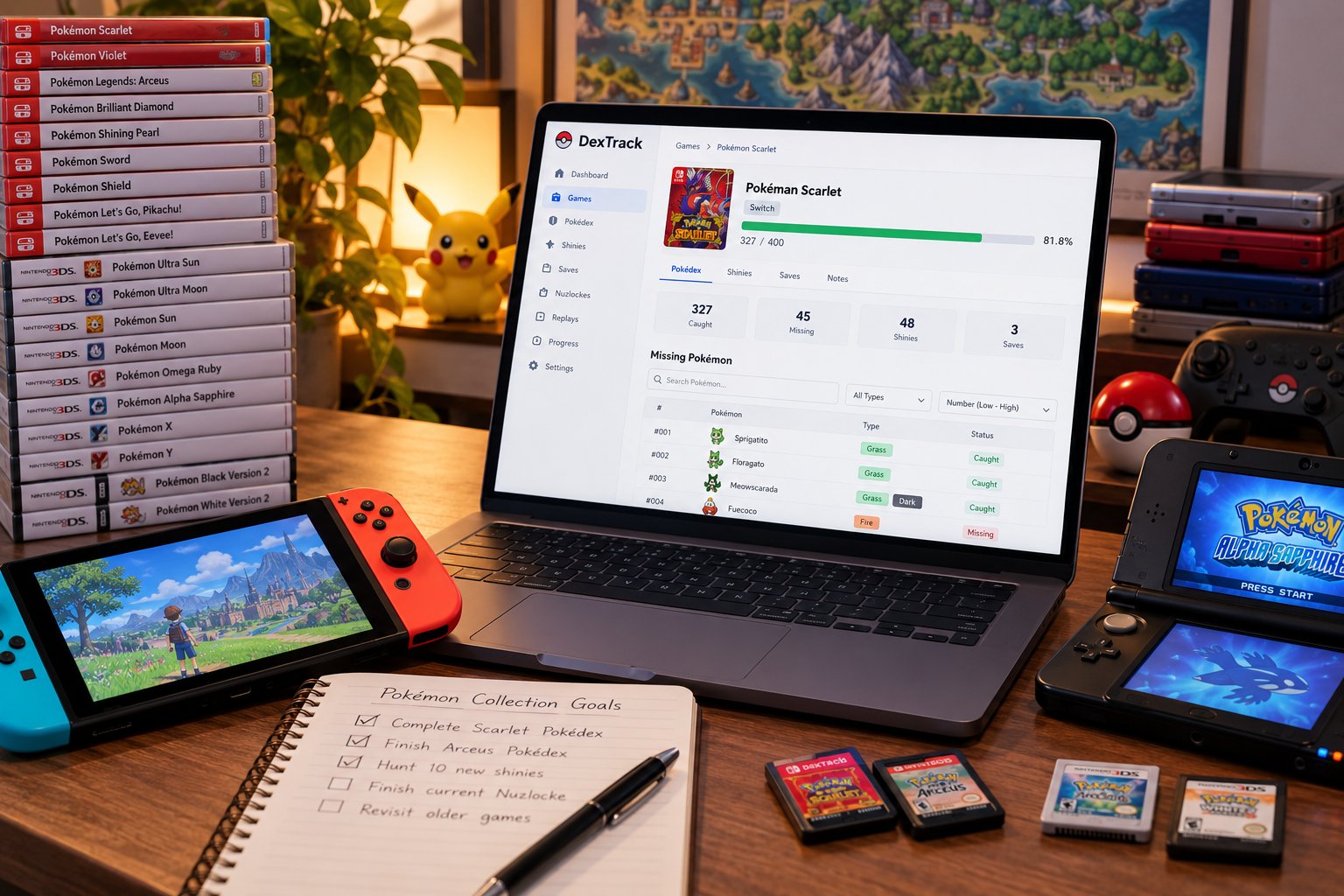
DexTrack is a comprehensive tracking application designed for Pokémon enthusiasts to manage their collections across multiple game titles. The platform allows users to monitor progress with per-game Pokédex completion percentages, track specific statuses like shiny or Alpha Pokémon, and maintain independent save files for different playstyles.
Choosing the Right Tool for Your Hunting Style
Not every tracker fits every hunter. Your playstyle matters.

Casual players who hunt a few shinies per year don't need advanced features. A simple counter and a list of caught shinies is enough. You want speed and simplicity.
Completionists hunting hundreds of shinies need power. Detailed hunt history, probability calculations, multiple save file support, and data export matter.
Nuzlocke runners need isolation. Your Nuzlocke team must stay separate from your main playthrough. The tracker must support independent save files with different team compositions and rules.
Some hunters run multiple Nuzlockes simultaneously with different rulesets. One hardcore, one relaxed, one randomizer. Your tracker needs to keep them all straight without confusion.
Ask yourself these questions before picking a tracker:
- How many games do you play regularly?
- Do you need automatic encounter counting or is manual fine?
- How important is exporting your data?
- Do you want cloud sync across devices or local-only storage?
- Will you use this for multiple years or just casually?
- Do you need separate profiles for different playstyles?
The right tool matches your answers.
Frequently Asked Questions
What should a shiny Pokémon tracker app include?
A good shiny Pokémon tracker app should count encounters automatically or let you log them manually, track elapsed hunting time, monitor shiny odds and probability, record captured Pokémon with their forms and alternate variants, and support multiple game versions independently. It should also allow you to add notes about each hunt and sync data across devices. Privacy and offline access are equally important, you want control over your collection data without mandatory account requirements.
Can you track shiny Pokémon across multiple games with one app?
Yes, dedicated shiny Pokémon trackers are designed to track shiny Pokémon across games. A good tracker maintains separate progress for each game title, so your Pokémon Scarlet hunts don't mix with your Legends Arceus progress. This is especially valuable for completionists managing collections across generations and for Nuzlocke runners maintaining independent save files with different rulesets. Look for apps that support future game releases without requiring updates.
How do you track shiny hunts in Pokémon games?
Track shiny hunts by recording your encounter count, elapsed time, and hunt method in your shiny hunt counter app. Start a new hunt session when you begin grinding, log each encounter (automatically if the app supports it, or manually by tapping a button), and note the shiny odds for your specific method. Track whether you're using the Masuda method, chain hunting, or soft resetting. Record the shiny when caught, including its nature, abilities, and any alternate forms. Review your hunt history to monitor patterns and adjust strategies.
Is there a free shiny Pokémon tracker app available?
Yes, free shiny Pokémon tracker apps exist, though features vary. Some offer core functionality at no cost, encounter counting, hunt timing, and basic collection logging, while others use freemium models with optional premium features. When evaluating free options, check whether the app requires account creation, what happens to your data if the service closes, and whether you can export your collection. Free plans should still support multiple games and allow you to track shiny Pokémon across your library without losing access to past hunts.
The biggest challenge with shiny hunting isn't finding the Pokémon. It's staying organized across multiple games and hunt sessions without losing data or motivation. A dedicated shiny Pokémon tracker solves this. DexTrack lets you track hunts game by game, manage multiple save files independently, and add new Pokémon titles as they release. Your collection data stays yours, always. Create a free account and start tracking your hunts today.