 How-to
How Can You Track Pokémon Progress Across Multiple Game Saves?
Last Updated: October 25, 2026
Quick Summary
To track pokemon progress save by save, create a separate tracker entry for each game save with its own Pokédex completion status, playstyle label, and catch records. This keeps your main save, Nuzlocke runs, and other playthroughs organized so you know exactly which species you own in each title without mixing progress across games.
- Create one independent tracker entry per game save to prevent mixing progress between playstyles
- Record your baseline by marking every species you've caught in each save before logging future catches
- Use color-coding or labels to distinguish saves by playstyle such as Main, Nuzlocke, or Replay
- Update one save at a time during gaming sessions to avoid logging catches in the wrong tracker profile
- Back up your tracker data monthly or after major milestones to protect your progress records
Table of Contents
- Why Tracking Pokémon Progress by Save File Matters
- Setting Up Your Pokédex Completion Tracker by Game
- Managing Multiple Pokémon Save Files Without Confusion
- Building Your Pokémon Living Dex Tracker Across Titles
- Tracking Shiny Pokémon and Special Status Across Games
- Backing Up and Protecting Your Tracker Data
- Getting Started with DexTrack Today
- Frequently Asked Questions
Why Tracking Pokémon Progress by Save File Matters
Learning how to track pokemon progress save by save helps you manage a Pokémon collection across multiple games, which gets confusing fast.
This is where tracking Pokémon progress by save becomes essential. Without organization, you lose visibility and waste time searching through game files.
Each save file has its own Pokédex completion status: your main save might be at 80% while a Nuzlocke sits at 30%. A shiny hunt tracker needs to separate encounters across games, and a living Dex tracker requires knowing which species you own in which save.
Tracking by save file solves this by:
- Showing completion percentages for each individual save
- Keeping Nuzlocke teams separate from casual saves
- Recording shiny encounters without mixing them across games
- Letting you see at a glance which Pokémon you're missing in each title
The right tracking system transforms this chaos into clarity: you know your exact progress and stop duplicating effort.
Setting Up Your Pokédex Completion Tracker by Game
Start by choosing what you want to track, a full Pokédex, a living Dex, or a Nuzlocke run, since each determines how you organize your tracker.
Define your collection goal first:
- Full Pokédex: catch every species available in that game
- Living Dex: own one of every species across all your saves
- Nuzlocke: track team composition and catch limits per save
- Shiny hunt: record encounter counts and caught shinies
- Casual collection: track species you own without pressure
Once you know your goal, create a separate tracker entry for each game save.
Official Pokémon game documentation lists which species appear in each title, so you know what's available to catch in your current save.
Set up your tracker structure:
- Create one entry per game save
- Label each save with its playstyle (Main, Nuzlocke, Replay, etc.)
- Record the game title and version clearly
- Note your completion goal for that save
Then input your current progress by marking which Pokémon you've caught in each save, time-consuming upfront, but it gives you a complete baseline to track pokemon progress save by save.
You can plan a Pokédex checklist you can actually finish by setting realistic goals for each save and understanding how completion percentages change as you catch new species.
A Practical Setup Workflow for Save-Based Tracking
Most trackers treat a save file as a single profile, build that profile to mirror your actual game data.
Step 1: Create a save profile. In your tracker, add a new game entry.
Step 2: Record your baseline. Open the game save and mark every species you've caught. For a living Dex, note which box holds each Pokémon. Future updates only add new catches.
Step 3: Log catches as they happen. After each session, mark new species.
Step 4: Verify completion. When you think you've finished a save's Pokédex, cross-check against the game's own Pokédex screen, species by species. Watch for version exclusives and trade evolutions, the most common gaps.
This workflow works for any game with a visible Pokédex, from Sword and Shield through Scarlet and Violet. For older titles or spin-offs, use a species list from the game's documentation and mark captures manually.
Managing Multiple Pokémon Save Files Without Confusion
The biggest mistake players make is mixing saves together, logging a Nuzlocke shiny in your main save's tracker, or losing track of which Pokémon belong where.
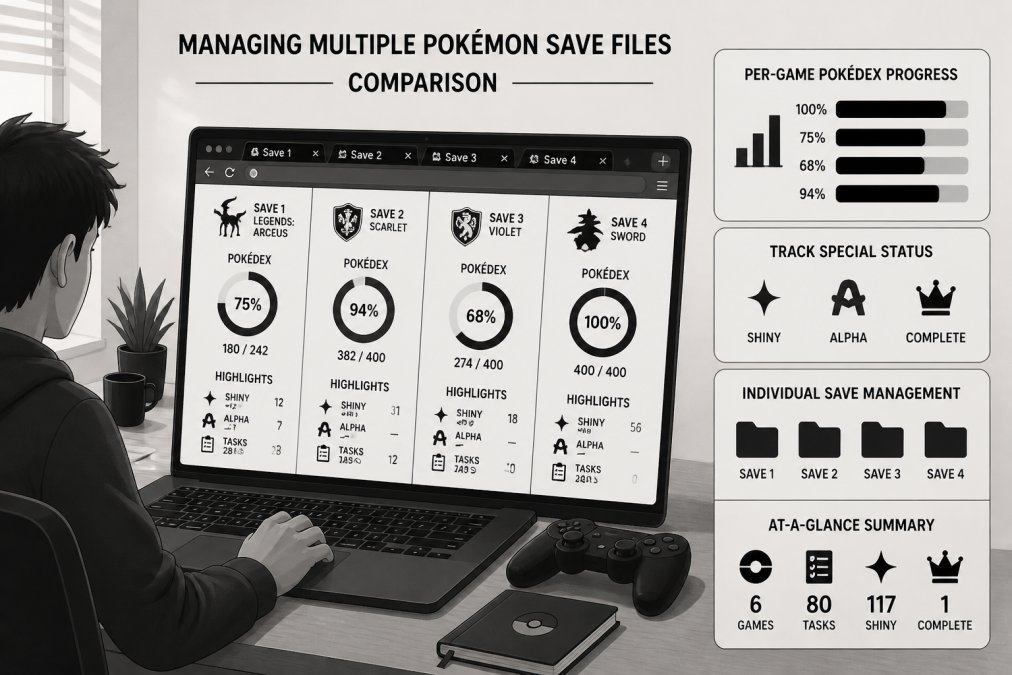
Keep your saves completely separate in your tracker.
Use these strategies to stay organized:
- Color-code or label each save by playstyle
- Check the correct save before logging any catch
- Review your tracker before starting a gaming session
- Keep save names consistent across all your tracking tools
- Update one save at a time to prevent mix-ups
The tracker should mirror your actual game saves exactly. Three Scarlet saves (main, Nuzlocke, replay) means three separate Scarlet entries, no shortcuts.
When you switch between saves, switch your tracker focus too. Starting a Nuzlocke session? Open that save's tracker tab. This habit prevents updating the wrong save.
You can learn how to manage different playstyles with strategies designed specifically for keeping multiple runs organized and separate.
Building Your Pokémon Living Dex Tracker Across Titles
A living Dex means owning one of every Pokémon species, and the challenge is tracking which species you own across multiple saves and titles.
Your living Dex tracker needs to show species availability by game. Start by listing every Pokémon species you're targeting. Then mark which games you own them in.
Structure your living Dex tracker this way:
- List each species name
- Mark which games it appears in
- Note which saves currently own that species
- Track evolutionary lines as connected groups
- Update when you catch duplicates in new games
Many players organize by generation or type, all Kanto Pokémon in one section, all fire types together, to spot gaps faster.
The real power comes when you see which species are game-exclusive. Some Pokémon only appear in Scarlet, others only in Violet.
When you catch a species you already own in another save, mark it, you now have that Pokémon in multiple games, which matters for your collection goals.
Tracking Shiny Pokémon and Special Status Across Games
Shiny Pokémon need their own tracking system. They're rarer and require patience, so your shiny tracker should separate encounters from captures and track which game each shiny came from.
Start a shiny hunt by recording your target species and starting encounter count, then log each encounter as you hunt.
Track shiny status with these details:
- Target species name
- Game and save file
- Starting encounter count
- Current encounter count
- Capture date when you get the shiny
- Special notes (Alpha status, nature, IVs, etc.)
You can build a shiny hunt plan and keep a useful encounter record with step-by-step guidance on setting up individual hunts and maintaining accurate encounter logs.
Keep shiny records separate from your regular Pokédex tracker. Your main tracker shows caught Pokémon; your shiny tracker shows hunting progress.
Record the exact game and save where each shiny came from. A shiny Gyarados caught in your Scarlet save belongs to your Scarlet shiny tracker, not your Violet tracker.
Backing Up and Protecting Your Tracker Data
Your tracker data is valuable, you've invested time recording progress across multiple saves. Protect it with regular backups and safe storage.
Most trackers offer automatic saving, so your progress updates without you thinking about it and entries survive a device crash or accidental app close.
Protect your tracker with these practices:
- Use automatic save features if available
- Create manual backups monthly or after major progress
- Store backups in multiple locations
- Use strong passwords if your tracker requires login
- Avoid sharing tracker access with untrusted sources
- Keep your device software updated
Your tracker should never hold your only record of progress. If the tracker goes down temporarily, you can restore from backup. If you switch devices, your data transfers with you.
Think of your tracker backup like a save file backup. You wouldn't risk losing a months-long save without a backup. Your tracker data deserves the same protection.
Exporting, Restoring, and Transferring Tracker Data
A backup is only useful if you can restore it. Here's how to handle the three operations that matter most.
Exporting: Look for an export option in your tracker's settings. Common formats are CSV, JSON, or a proprietary backup file. Export after major milestones, completing a regional Pokédex, finishing a shiny hunt, or adding a new save profile.
Restoring: If you need to restore, import the backup file through the tracker's import function. Check that the restored data matches your last export: compare completion percentages and a few specific entries.
Transferring across devices: If you're moving from one phone or computer to another, export from the old device and import on the new one.
Privacy and Safe Save-File Handling
When you use a tracker, you're sharing information about your game progress. Before entering data, check the tracker's privacy policy: does it collect personal information? Does it share data with third parties? Prefer trackers that store data locally or offer a clear opt-out.
Avoid tools that ask you to upload your actual game save file unless they are official or widely trusted. A save file contains your game data, and uploading it to an unknown service is a security risk. Manual entry, marking catches yourself, is slower but safer.
Safe handling checklist:
- Use trackers with clear privacy policies
- Prefer local storage or account-based sync you control
- Never upload save files to unverified services
- Keep your device and tracker app updated
- Log out of shared devices after use
Your progress data is yours. A good tracker helps you organize it.
Getting Started with DexTrack Today
Setting up a tracker for your Pokémon saves doesn't need to be complicated. Start simple. Pick one save. Track its progress.
DexTrack makes this straightforward. Create an account and add your first game. Log your current Pokédex progress.
When you're ready, add a second save. Your Nuzlocke, your replay, your shiny hunt save. Each one gets its own independent tracker.
Your first steps:
- Track your collection for free with DexTrack's free plan
- Create your first game save entry
- Log your current Pokédex progress
- Set your completion goal
- Update progress as you play
- Install DexTrack on your phone for tracking on the go
The tracker grows with you. As you add new Pokémon titles, you add them to your tracker.
Your collection deserves a system that works as hard as you do. DexTrack keeps your progress organized across saves, games, and playstyles.
Tracking Pokémon progress across multiple saves creates clarity where confusion used to live. You know your exact completion percentage in each game.
| Tracking Goal | Best Approach | Update Frequency |
|---|---|---|
| Full Pokédex | Log species as you catch them | After each session |
| Living Dex | Track species across all saves | Weekly or after major progress |
| Nuzlocke | Record team and encounter limits | After each battle or session |
| Shiny Hunt | Count encounters and log captures | During active hunt sessions |
| Casual Collection | Mark owned species | When you remember to update |
Frequently Asked Questions
How do you track Pokédex progress for multiple Pokémon saves?
Use a dedicated tracker that supports per-game progress monitoring. Record which Pokémon you've caught in each save file separately, tracking completion percentage by game title. This prevents mixing data from different playthroughs, crucial if you're running a main save, Nuzlocke, or replay simultaneously. A tracker like DexTrack lets you add games independently and update each one without affecting the others.
What should I record for each Pokémon save file?
Track caught status, owned species count, Pokédex completion percentage, and any special markers like shinies or Alpha Pokémon. For competitive or challenge runs, note your active team composition and level caps. Record the game version, save file name, and playstyle (main, Nuzlocke, casual replay) so you can distinguish between saves at a glance. This level of detail prevents confusion when managing multiple active saves.
Can you keep separate Pokémon trackers for different playthroughs?
Yes, a proper tracking system supports multiple independent save files within the same application. You can maintain a main playthrough tracker, a Nuzlocke tracker, and a shiny-hunting tracker simultaneously without data overlap. Each save file stays isolated, so updates to one don't affect the others. This is especially useful if you're juggling different rulesets or challenge modes across the same game title.
Why is tracking Pokémon progress by save better than using a spreadsheet?
A dedicated tracker organizes data by game and save file automatically. Spreadsheets work but require constant manual formatting and become unwieldy across multiple games. A tracker designed for Pokémon collection management also supports future game titles without rebuilding your system, and keeps your data organized in one place across all your saves and games.