 Listicle
Best Apps for Nuzlocke Tracking
Quick Summary
The best apps for nuzlocke tracking are browser-based trackers such as DexTrack, which runs in any web browser on desktop and mobile without an install. Choose one that covers your game and device, logs encounters quickly, and keeps separate saves for each run.
- DexTrack keeps main saves, Nuzlockes and replays in independent save files.
- Log each encounter as it happens, not at the end of a session.
- Record fainted Pokémon the same day so the graveyard stays accurate.
- Test offline behavior and export options before relying on a tracker for a long run.
- Use a separate save for each run to avoid mixing up teams.
Table of Contents
- What a Nuzlocke Tracker Needs to Do
- Comparison Table: Nuzlocke Tracker Apps at a Glance
- Nuzlocke Tracker App Options Reviewed
- Using an Online Pokémon Nuzlocke Tracker
- Logging Encounters, Deaths and Boss Preparation
- Keeping Multiple Runs and Save Files Separate
- Choosing Your Tracker and Starting Your Next Run
- Frequently Asked Questions
What a Nuzlocke Tracker Needs to Do
Last Updated: November 21, 2026
A Nuzlocke run is a challenge where a player loses any Pokémon that faints, and releases any Pokémon caught on a route after the first one. Keeping that straight across a full playthrough is hard without a record. A good Nuzlocke tracker helps with this by logging encounters, marking fainted Pokémon, and keeping your party and boxes organized as the run goes on.
Before you pick a tool, know what it has to handle. A useful tracker logs each encounter by route or location, records which Pokémon were caught, and flags the ones that have fainted. It should show your current party and track progress through the Elite Four. Game and generation support matters too, since a tracker that only covers one generation is no use for a newer game.
The features you will use most are usually the simple ones: a fast way to log an encounter the moment it happens, and a clear graveyard of lost Pokémon. Start with those two, then check the rest of the list.
Comparison Table: Nuzlocke Tracker Apps at a Glance
The table below compares the tools covered in this guide across the factors that matter most for a Nuzlocke run: platform, game support, offline access, account requirements, and key tracking features. Where a detail could not be confirmed from public information, we say so rather than guess.
| Tool | Platform | Game Support | Offline Access | Account Required | Key Features | Watch For |
|---|---|---|---|---|---|---|
| DexTrack | Web browser (desktop and mobile) | Per-game tracking across multiple saves | Not confirmed | Free account | Separate saves for main game, Nuzlocke, and replays; collection tracking | Built for collection tracking, not a Nuzlocke-only tool |
| Nuzlocke Tracker (nuzlockeredux.com) | Web browser | Not specified | Not confirmed | Not stated | Encounter logging, team coverage, boss-battle info, graveyard history, randomizer support, ROM hack guides | Supported devices not specified |
| Nuzlocke Tracker (nuzlocketracker.org) | Web browser | Emerald through Generation 9 | Not confirmed | Not stated | Free encounter and challenge-run tracking from first route to Elite Four | Full feature set not detailed |
| Nuzlocke Tracker (nuzlocke-redux.vercel.app) | Web browser | Not specified | Not confirmed | Not stated | Encounter tracking, boss-battle prep with stats, movesets, and abilities | Pricing not stated |
| Nuzlocke.app | Web browser (open source) | Not specified | Not confirmed | Not stated | Encounter tracking, status recording, boss information and advice | Maintenance not confirmed |
| Nuzlocke Chart | iPhone app | Not specified | Likely offline (native app) | Not stated | Route and encounter references | Free version limited to one active run |
| Pokélink | Not confirmed | Not confirmed | Not confirmed | Not stated | Logging encounters, deaths, and team progress | No official URL or pricing found |
How to read this table: Start with the platform column if you play on a specific device. If you often play without reliable internet, prioritize tools with confirmed offline access, though note that most browser-based trackers in this list do not publicly document offline functionality, so test before committing a long run. The account column matters if you want to sync across devices or avoid signing up; several tools do not state whether an account is required. Finally, the key features column highlights the unique strengths of each tool, but the 'Watch For' column flags the trade-offs or missing information you should verify on the tool's site before starting a run.
Nuzlocke Tracker App Options Reviewed
We looked at the options that turned up in our research. Each one covers the basics, but they differ in platform, game support and extras. Where a detail was not confirmed, we say so rather than guess. For a broader look at which tools suit a run, see which run-tracking tools are best.
Browser-Based Trackers
Most Nuzlocke trackers run in a web browser, which means no install and no app store. They are the easiest place to start.
DexTrack is a browser-based option built around per-game progress. It lets you maintain independent save files for main saves, Nuzlockes and replays, so a Nuzlocke does not get mixed up with your main game.
Mobile and iPhone Options
If you play on the go, a phone app can be more convenient than a browser tab.
Pros and Cons at a Glance
- DexTrack: Independent save files; not a Nuzlocke-only tool.
- Nuzlocke Tracker (nuzlockeredux.com): Randomizer support and graveyard history; devices not specified.
- Nuzlocke Tracker (nuzlocketracker.org): Free and broad game coverage; feature set not detailed.
- Nuzlocke Tracker (nuzlocke-redux.vercel.app): Battle prep included; pricing not stated.
- Nuzlocke.app: Open source with boss advice; maintenance unconfirmed.
- Nuzlocke Chart: Good iPhone route data; free version limited to one run.
- Pokélink: Covers deaths and team progress; no confirmed official details.
Using an Online Pokémon Nuzlocke Tracker
An online tracker is only as useful as your habit of updating it. But the tool itself also needs to fit your workflow. Here is what to look for and how to get the most out of a browser-based tracker.
Set up your run before the first battle. Enter your starting Pokémon, select the game and generation, and note the rules you are playing by. Some players allow revives or use a randomizer, and a good tracker lets you record those choices so the record stays honest. If the tracker supports custom rules, configure them upfront, changing rules mid-run can invalidate your log.
Log each encounter as it happens, not at the end of a session. Waiting until later is how deaths get forgotten and the graveyard goes wrong. The best trackers make this fast: a single form or quick-add button that takes seconds. Test this during your first few routes; if logging an encounter feels cumbersome, you are less likely to keep it up.
Check offline behavior and autosave. Most browser-based trackers require an internet connection, and few publicly document offline functionality. Before you rely on one, test whether it works with your browser offline, and confirm whether your data is saved automatically or requires a manual save. A common pattern is that trackers store data locally in your browser, which means clearing your cache could wipe your run. Look for export or backup options if available.
Understand account and data portability. Some trackers require an account to save runs; others store data only on your device. If you play on multiple devices, an account with sync is valuable. If you prefer not to sign up, check whether the tool offers a local-only mode. Also look for export features, being able to download your run as a file is the safest way to avoid losing progress.
Evaluate usability on your device. Browser-based trackers should work on both desktop and mobile, but the experience varies. Test the layout on your phone: are buttons large enough to tap, and does the page require excessive scrolling? Keyboard access matters on desktop if you prefer shortcuts. A tracker that is hard to use on your primary device will slow you down during a run.
Watch out: If a tracker does not clearly state how it stores data or whether an account is required, treat your run as at-risk until you confirm backup options. Losing a 20-hour Nuzlocke to a cleared cache is a common frustration.
Logging Encounters, Deaths and Boss Preparation
Three things make or break a Nuzlocke record: logging encounters, logging deaths, and preparing for bosses.
Log an encounter the moment you catch or skip a Pokémon. The first encounter on each route is the one that counts under standard rules, so mark it clearly. Record any Pokémon you release or lose, because a missing entry makes the rest of the run harder to trust.
Record deaths immediately. A fainted Pokémon belongs in the graveyard the same day it fell. Several trackers keep a graveyard view, which is worth using when you want to review how a run went.
Boss preparation is where a tracker with battle information pays off. Check each boss's stats and your team's coverage before you fight. The Use them to plan your team before the Elite Four, not after a loss.
Keeping Multiple Runs and Save Files Separate
Many players run more than one challenge, or keep a Nuzlocke going alongside a main save. Mixing those records is the fastest way to lose track of which team is which.
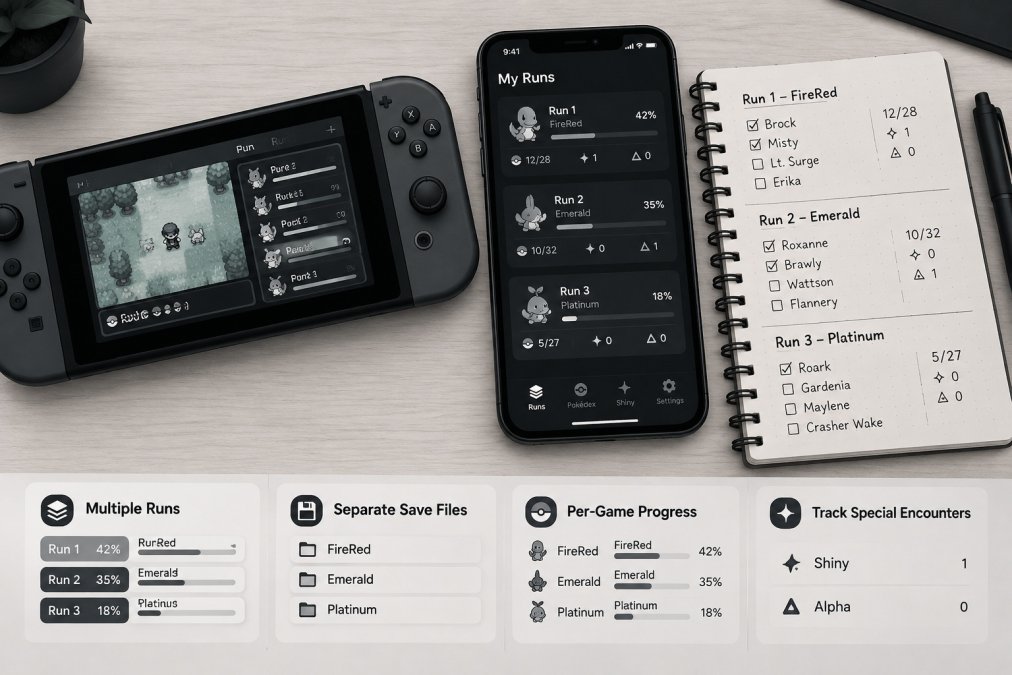
Use a separate save for each run. DexTrack lets you keep main saves, Nuzlockes and replays in independent save files, so each playthrough has its own record. If you run two Nuzlockes at once with different rules, check that your tracker can keep them apart before you start.
Name each run clearly, for example by game and rule set. Once a run ends, whether it was a win or a wipe, archive it rather than deleting it. A finished run is a useful record, and it stops old data from cluttering your active tracker.
Choosing Your Tracker and Starting Your Next Run
Pick a tracker based on what you play. Start with three questions. Does it cover the game you are playing? Does it work on the device you use most? Does it keep separate runs apart?
If you want a single place to track your full collection across games and save files, DexTrack's free account is a reasonable place to begin.
Test your choice on a short run before you commit to a long one. Log a few encounters, record a fainted Pokémon, and check that the graveyard and party views look right. Once that works, start your next run with confidence.
Frequently Asked Questions
What is the best app for tracking a Pokémon Nuzlocke?
There is no single best option, because the right tracker depends on which games you play and where you play them. Browser-based trackers suit players who want encounter logs, fainted Pokémon records and boss preparation details in one place. If you play on an iPhone and want route and encounter references while you play, a dedicated iPhone app may fit better. Check which games each tool supports before you start a run, then pick the one whose features match how you like to record your team.
Are there free Nuzlocke trackers for Pokémon games?
Yes. Several browser-based Nuzlocke trackers are free to use, including options that cover a wide range of games from Emerald through Generation 9. Some tools that are free to start with also offer a paid tier with extra information, so read each tool's pricing page for current terms. Free trackers are a good starting point for a first run, and you can compare features before deciding whether to pay for anything.
Can I track encounters and fainted Pokémon in a Nuzlocke app?
Most Nuzlocke trackers let you log every encounter on each route and mark Pokémon that have fainted, which builds your run's graveyard. Look for a tracker that keeps fainted Pokémon separate from your living team so your party view stays accurate. Some trackers also record how each Pokémon died and which boss battle it was lost in, which helps you learn from mistakes in later runs.
Can I use a Pokédex tracker to manage separate Nuzlocke saves?
A Pokédex tracker is built for completion goals, so it may not handle Nuzlocke rules such as one encounter per route or permanent loss of fainted Pokémon. A dedicated Nuzlocke tracker is usually better for those rules. If you want to use DexTrack alongside a Nuzlocke tracker, you can keep your Nuzlocke run and your main save in separate tools, so each game's progress stays independent.